%2520(1).png)
Digital room booking: Making calendar information visible at the meeting room
A meeting room is booked in the calendar but remains empty. Another room is occupied, yet there is no visible indication outside. Employees search for available spaces or interrupt meetings. GGM Gastro wanted to make room usage at its Ochtrup location more transparent while keeping its established Microsoft 365 and Outlook workflow.
The challenge: Room status was not visible where it was needed
Calendar information existed digitally, but not directly at the room. Employees had to check their calendar first or search for an available space. A similar requirement existed in the showroom, where visitors and staff needed to see whether customer advisers were available.
The solution: 10-inch touch displays outside meeting rooms
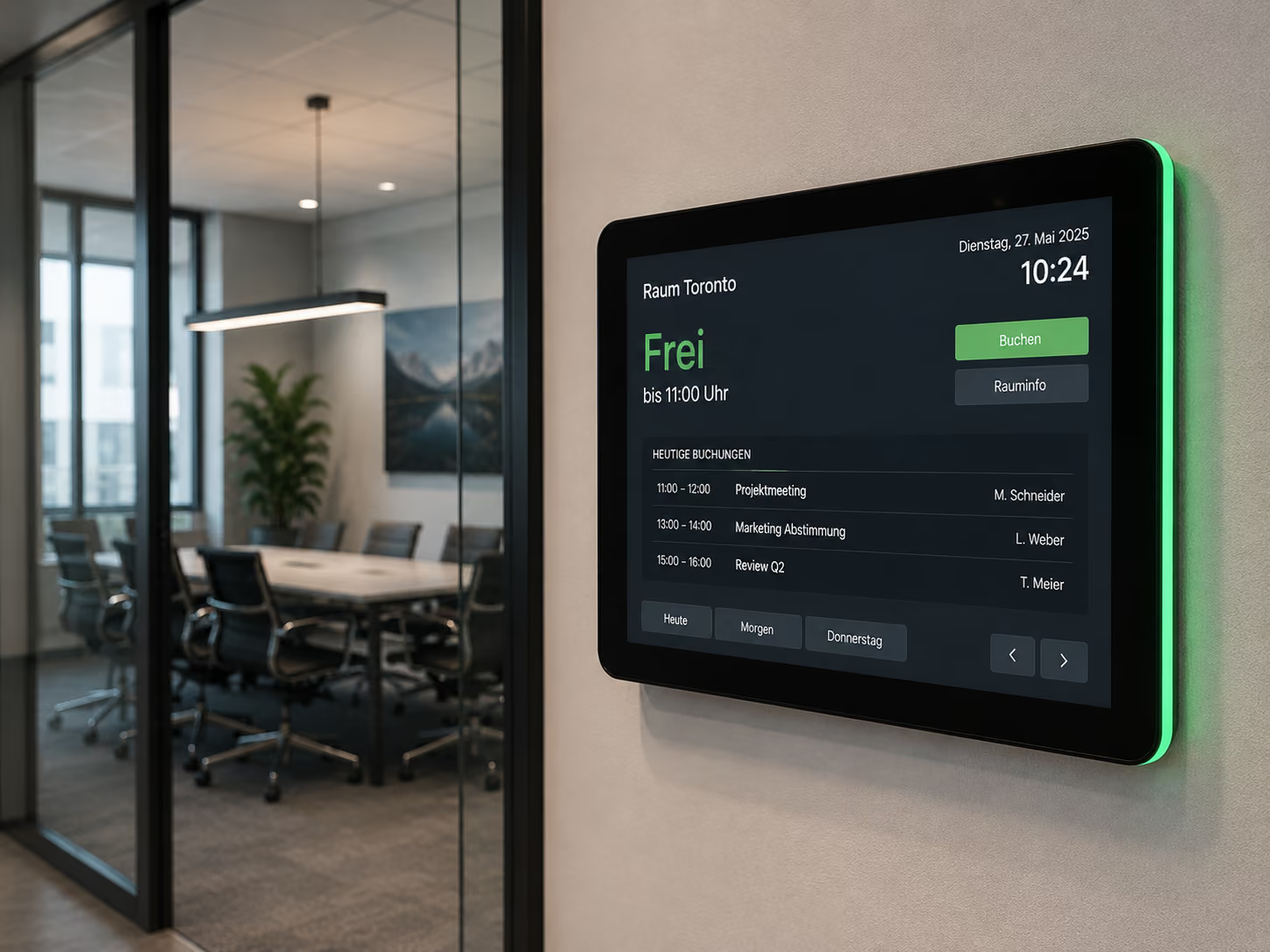
GGM Gastro uses 10-inch ProDVX touch displays with connectSignage. They show whether a room is free or occupied, the current appointment and the next booking.
Employees can book an available room directly on the display or continue using Microsoft 365 and Outlook. The information is synchronized automatically so the calendar and the display reflect the same status.
What information is visible at the room?
- current free or occupied status
- the current meeting
- the next scheduled booking
- calendar information from Microsoft 365 and Outlook
A second use case: Live availability in the showroom
GGM Gastro also uses displays in the showroom to visualize whether customer advisers are available or already in a consultation. The same principle therefore supports another business process beyond meeting rooms.
Why the Microsoft 365 integration matters
A room booking solution should not force employees to maintain a second calendar. At GGM Gastro, Microsoft 365 and Outlook remain part of the established workflow, while connectSignage makes the information visible at the physical room and enables direct interaction on the touch display.
Explore digital room booking, meeting room displays and the GGM Gastro reference.
More examples and typical applications for this sector can be found on our Digital Signage for hospitality page.
Frequently asked questions about digital room booking
How does room booking with Microsoft 365 and Outlook work?
Calendar information is synchronized with the room displays, allowing existing Microsoft 365 and Outlook booking processes to remain in place.
Can meeting rooms be booked directly on the display?
Yes. GGM Gastro allows available rooms to be booked directly on the 10-inch touch displays.
What does a digital room booking display show?
It shows whether a room is free or occupied, the current appointment and the next booking.
What are the benefits of a display outside the meeting room?
Employees can see room status immediately, spend less time searching for available rooms and make spontaneous bookings more easily.
How does GGM Gastro use live availability outside meeting rooms?
Showroom displays show whether customer advisers are currently available or already in a consultation.
Conclusion
GGM Gastro demonstrates how digital room booking can extend existing Microsoft 365 processes by making calendar data visible exactly where employees need it.
Bereit für einfaches und leistungsstarkes Digital Signage?
Erlebe connectSignage live und entdecke, wie du digitale Displays, Inhalte und Standorte zentral steuerst und Digital Signage für deine Unternehmenskommunikation einsetzt.
Weitere Insights rund um Digital Signage
Entdecke weitere Artikel zu Digital Signage, interner Kommunikation, Integrationen und konkreten Anwendungsfällen.
.png)

.png)
.png)
.png)
.png)
.png)
.png)